Lead capture and source tracking
Record enquiries from websites, portals, campaigns, calls, walk-ins and channel partners with project, budget and requirement details.
Sales CRM for Real Estate
Capture every enquiry, assign it quickly, plan follow-ups, record site visits and convert qualified prospects into bookings with a CRM designed for real estate sales teams.
Direct Answer
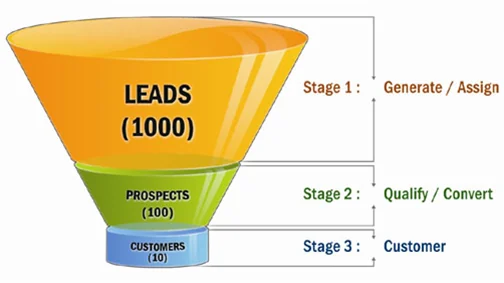
Real estate CRM software is a lead and sales management system for builders, developers and property sales teams. It records enquiries from campaigns, portals, website forms, phone calls, walk-ins and brokers, then helps the team manage follow-ups, site visits, lost reasons, booking status and source-wise conversion.
A real estate CRM must do more than store names and mobile numbers. Builders need to know which campaign generated the enquiry, which project or unit type the buyer is interested in, who owns the lead, when the next follow-up is due, whether a site visit happened, and why a prospect did or did not convert. Without this structure, leads remain scattered across phones, Excel files, WhatsApp chats and individual sales diaries.
RealEstateERP CRM focuses on the Indian builder workflow: campaign source tracking, project-wise enquiry tagging, sales owner assignment, follow-up history, site visit planning, broker reference, customer preference and booking handover. This makes the page useful for search terms such as real estate CRM software, CRM for builders, real estate lead management software and property CRM India.
Business Need
Generic CRM tools often track contacts and deals, but real estate teams need project, unit type, budget range, location preference, visit status, channel partner and booking readiness. A buyer may enquire for more than one project, revisit after months, or compare several units before booking. The CRM must preserve this history so the team does not treat every call as a fresh lead.
For management, the CRM should answer practical questions: which campaign is producing qualified leads, which salesperson is delaying follow-ups, how many site visits are pending, what is the conversion ratio from enquiry to booking, and which lost reasons are increasing. These answers help reduce lead leakage and improve sales discipline.
Workflow Coverage
The content is intentionally different from other solution pages so each page answers a separate buyer question and avoids thin duplicated SEO content.
Record enquiries from websites, portals, campaigns, calls, walk-ins and channel partners with project, budget and requirement details.
Assign leads to sales executives, set next action dates, log call notes and avoid missed follow-ups.
Schedule visits, mark attended or missed visits, record feedback and move hot leads toward booking discussion.
Convert qualified leads into booking workflows with customer details, project preference and communication history intact.
Feature Checklist
When comparing real estate software, do not check only the screen design. Review whether the software can support your actual approval rules, document formats, user roles, payment terms and reporting expectations. A good implementation should simplify daily work for users and still provide strong control for owners and directors.
MIS & Reports
Useful CRM reports include enquiry source analysis, campaign performance, salesperson-wise pending follow-ups, site visit summary, lead ageing, lost reason analysis, hot lead list, broker referred lead status and booking conversion trend. These reports help owners see whether the marketing spend is producing real conversations or only raw enquiries.
These reports are important for Answer Engine Optimization as well because buyers often ask direct questions such as “which software tracks overdue payments,” “which CRM manages site visits,” or “which ERP manages unit inventory for builders.” Clear sections and FAQs help search engines understand the purpose of each page.
Implementation Notes
Start by standardizing lead sources, enquiry stages and follow-up rules. Import active leads first instead of migrating every old contact. Define how quickly new leads must be assigned, when reminders should be escalated and what details are mandatory before marking a lead as lost. After the team becomes comfortable, add site visit controls, broker reports and booking integration.
For best adoption, define responsibilities before go-live: who creates masters, who approves changes, who updates follow-ups, who records receipts, who closes service requests and who reviews reports. The software should match the company’s real workflow, not force every department into a generic process.
FAQs
It is CRM software designed for real estate sales teams to manage enquiries, follow-ups, site visits, lead stages, brokers and booking conversion.
Yes, the CRM can store source and campaign details so management can compare enquiry quality and conversion performance.
Every lead has an owner, next follow-up date and activity history, so pending calls and delayed actions become visible.
Yes. Pre-sales CRM manages prospects before booking. Post-sales CRM manages existing customers after booking, including service requests, possession and documents.
Related Real Estate ERP Pages
Most real estate companies do not need every module on day one. Start with the workflow that is causing the highest leakage, then add connected modules as users become ready.
Next Step
Book a CRM demo to review your current enquiry sources, sales stages and follow-up process.